How to Reverse a String in JavaScript

Reversing the order of characters in a string is one of the most commonly asked questions in coding interviews, algorithm challenges, as well as various real-world applications such as data encoding and decoding, palindrome checking, text processing, and so on. In this tutorial, we are going to explore several different ways to reverse a string in JavaScript.

How to reverse a string using the reverse() method

First, you should know that unlike reversing arrays in JavaScript, there isn't a built-in method specifically for reversing strings. However, there is a workaround. You can convert the string into an array, reverse it using the reverse() method, and finally convert the array back into a string.

Here is a demonstration:

javascript
let originalString = "Hello, World!";
let array = originalString.split("");
let reversedArray = array.reverse();
let reversedString = reversedArray.join("");
 
console.log(array);
console.log(reversedArray);
console.log(reversedString);
text
[
 '!', 'd', 'l', 'r',
 'o', 'W', ' ', ',',
 'o', 'l', 'l', 'e',
 'H'
]
[
 '!', 'd', 'l', 'r',
 'o', 'W', ' ', ',',
 'o', 'l', 'l', 'e',
 'H'
]
!dlroW ,olleH

When given an empty string (""), the split() method will split the entire string into an array of individual characters. The reverse() method will then reverse the order of elements in the array, and finally join() joins the characters back together into a string.

Alternatively, you can convert the string into an array using the spread syntax.

javascript
let originalString = "Hello, World!";
let reversedString = [...originalString].reverse().join("");
console.log(reversedString);
text
!dlroW ,olleH

Everything else works exactly the same.

How to reverse a string using for loops

If you don't want to turn strings into arrays, you can also use a for loop to reverse a string in JavaScript. Recall that it is possible to access individual characters in a string using the square bracket syntax. So this is what you can do:

javascript
let originalString = "Hello, World!";
let reversedString = "";
 
for (let i = originalString.length - 1; i >= 0; i--) {
  reversedString += originalString[i];
}
 
console.log(reversedString);
text
!dlroW ,olleH

In this example, we initialized an index i and made sure it points at the last character in the array (i = originalString.length - 1).

The index i decrements by 1 for every iteration until it reaches 0, which points to the first character of the string.

And for every iteration, the character that i points to will be appended to the reversedString.

How to reverse a string using recursion

Lastly, you can also reverse the string using recursion.

javascript
function reverseString(str) {
  if (str === "") {
    return "";
  } else {
    return reverseString(str.substr(1)) + str.charAt(0);
  }
}
 
let originalString = "Hello, World!";
let reversedString = reverseString(originalString);
 
console.log(reversedString);

In this example, when the reverseString() function is executed, it will test if str is empty. If it is, an empty string will be returned. If not, the string will be divided into two parts. The substr() method is used to extract a substring based on the given index.
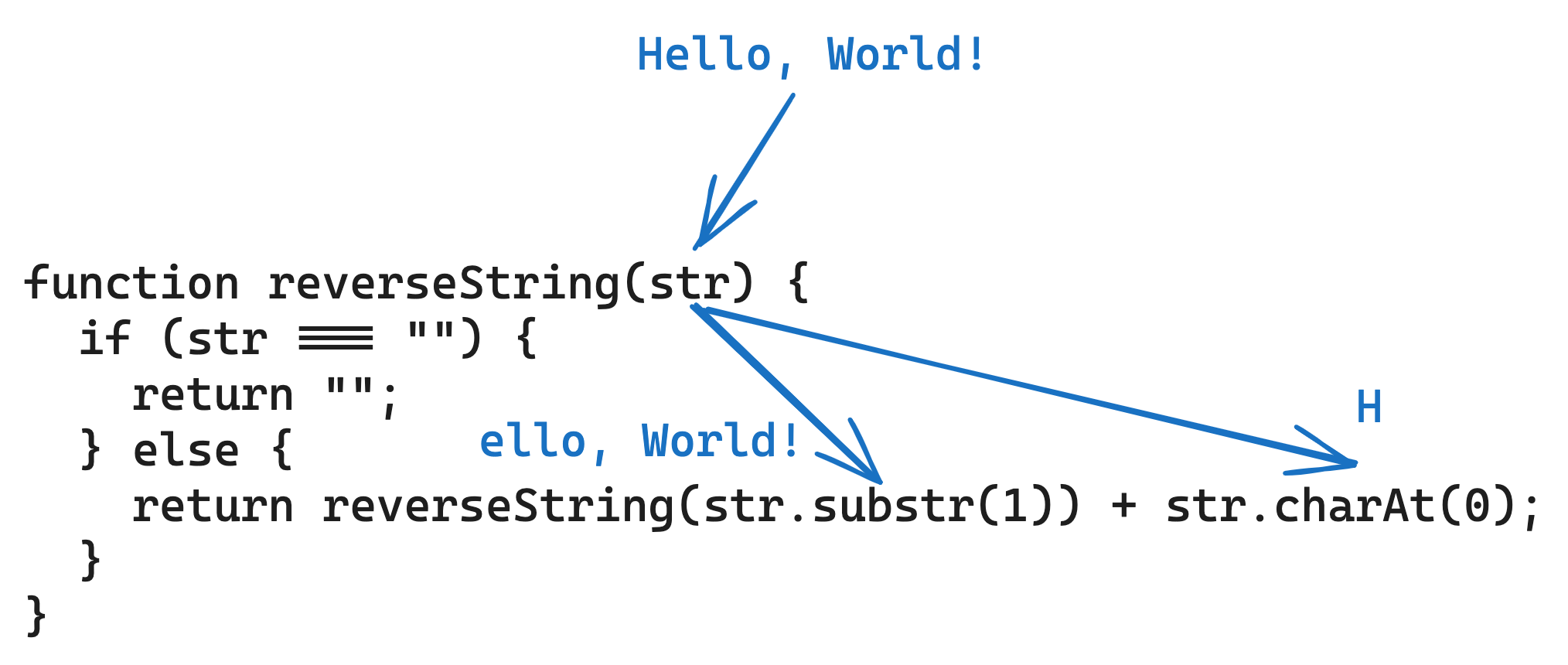
how to use recursion to reverse a string step one

And then, reverseString() will be called again, and this process will be repeated, until an empty string is returned.
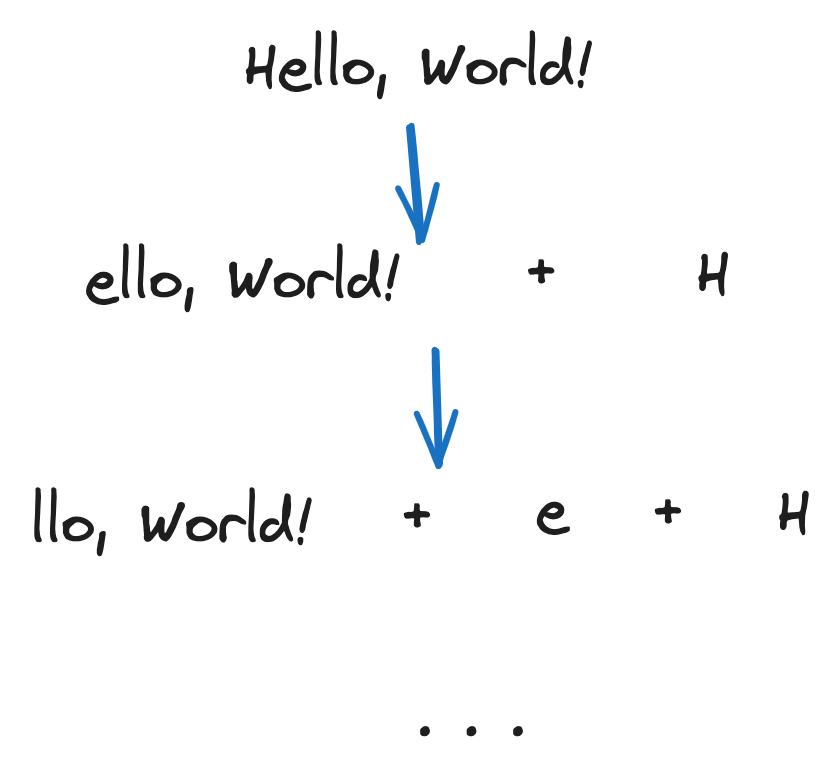
how to use recursion to reverse a string step 2

Conclusion

In this tutorial, we went over three different ways you can reverse a string in JavaScript. Hope this tutorial has been helpful to you.

Happy coding!

Learn, Build & Launch

With Our Full Stack Dev Roadmap with Next.js Boilerplate

Start for FREE 🎉

Subscribe below to grab our free Full-Stack Web Developer Starter Kit 👇

Also follow us onorwhere we share coding tips daily.

Course Outline
Introduction+
  • 1.Course Introduction
HTML & CSS+
  • 1.Preparations
  • 2.HTML Elements
  • 3.Text Elements
  • 4.Layout Elements
  • 5.Cascading Style Sheet
  • 6.Basic Selectors
  • 7.Advanced Selectors
  • 8.Colors
  • 9.Loading Font
  • 10.Font Customization
  • 11.Text Customization
  • 12.Text Spacing
  • 13.Text Alignment
  • 14.Functions
  • 15.@ Rules
  • 16.Links
  • 17.Lists
  • 18.Tables
  • 19.Forms
  • 20.Form Fields
  • 21.Media Files
  • 22.Aspect Ratio
  • 23.Object Fit
  • 24.Cursor Behavior
  • 25.Scroll Behavior
  • 26.Visibility & Opacity
  • 27.Box Shadow
  • 28.Color Background
  • 29.Image Background
  • 30.Background Attachment
  • 31.Gradient
  • 32.Blend Modes
  • 33.The Box Model
  • 34.Border
  • 35.Padding & Margin
  • 36.Element Size
  • 37.Display Types
  • 38.Overflow
  • 39.Float
  • 40.Position
  • 41.Z index
  • 42.The Column Layout
  • 43.The Grid Layout
  • 44.Grid Flow
  • 45.Grid Gap
  • 46.Grid Spanning
  • 47.Grid Alignment
  • 48.The Flexbox Layout
  • 49.Flex Gap
  • 50.Flex Order
  • 51.Basis, Grow & Shrink
  • 52.Flexbox Alignment
  • 53.Calculator
  • 54.Filters
  • 55.Transforms
  • 56.Transition
  • 57.Transition Timing Functions
  • 58.Transition Delay
  • 59.Animations
  • 60.Animation Iteration Count
  • 61.Animation Direction
  • 62.Animation Fill Mode
  • 63.Responsive Design
  • 64.Viewport
  • 65.Media Query
  • 66.Responsive Media
  • 67.Responsive Text
  • 68.Responsive Layout (Flexbox)
  • 69.Responsive Layout (Grid)
  • 70.Responsive Layout (Legacy)
  • 71.Layout Without Media Query
  • 72.Recreating YouTube
  • 73.Building the Layout
  • 74.Building the Navbar
  • 75.Building the Sidebar
  • 76.Building the Main Section
JavaScript Fundamentals+
  • 1.Introduction
  • 2.Basic Syntax
  • 3.Variables
  • 4.Data Types
  • 5.Numbers & BigInt
  • 6.Strings
  • 7.Boolean Values
  • 8.Undefined & Null
  • 9.Type Conversion
  • 10.If Statements
  • 11.Switch Statements
  • 12.While Loops
  • 13.For Loops
  • 14.Introducing Functions
  • 15.Variable Scope
  • 16.Arrays
  • 17.Mutating Array
  • 18.Searching Array
  • 19.Sorting Array
  • 20.Looping Array
  • 21.Objects
  • 22.Looping Object
  • 23.JSON
  • 24.Symbols
  • 25.Maps
  • 26.Sets
  • 27.Define Functions
  • 28.Function Arguments
  • 29.Rest Parameter & Spread Syntax
  • 30.Error Handling
  • 31.Pure Functions
  • 32.Functions as Value
  • 33.Higher Order Functions
  • 34.Function Factory
  • 35.Function Currying
  • 36.Function Wrapper
  • 37.Recursion
  • 38.Closure
  • 39.Methods
  • 40.Investigating "this"
  • 41.Losing "this"
  • 42.Constructor Functions
  • 43.Getters & Setters
  • 44.Prototypes Introduction
  • 45.Creating Prototypes
  • 46.Inspecting Prototypes
  • 47.Constructor with Prototype
  • 48.The Class Notation
  • 49.Class Inheritance
  • 50.Static Properties
  • 51.Private Properties
  • 52.Object Oriented Programming
  • 53.A Banking App
  • 54.Working with Date
  • 55.The Math Object
  • 56.JavaScript Modules
  • 57.Throwing Errors
  • 58.Asynchronous Programming
  • 59.Promise
  • 60.Resolve Promise
  • 61.Promise Chaining
  • 62.Async & Wait
  • 63.Best Practices
JavaScript in the Frontend+
  • 1.The DOM Tree
  • 2.Selecting Elements in the DOM
  • 3.DOM Navigation
  • 4.Changing Elements
  • 5.Adding Elements
  • 6.Removing Elements
  • 7.Event Handling
  • 8.Event Propagation
  • 9.Some Common Events
  • 10.Image Slider: Creating HTML
  • 11.Image Slider: Adding Styles
  • 12.Image Slider: Adding Scripts
  • 13.Image Slider That "Slides"
  • 14.Regular Expressions
  • 15.Regex Flags
  • 16.Regex Matching Character Sets
  • 17.Regex Boundary
  • 18.Regex Groups & Quantifiers
  • 19.Regex Lookahead & Lookbehind
  • 20.Regex Related Methods
  • 21.Calculator
  • 22.Canvas
JavaScript in the Backend+
  • 1.Setting Up a Dev Environment
  • 2.Network & HTTP
  • 3.A Basic Web App
  • 4.Express.js
  • 5.Routing
  • 6.MVC Architecture
  • 7.The Model Layer
  • 8.CRUD Operations
  • 9.The Controller Layer
  • 10.The View Layer
  • 11.Blog
  • 12.ORM Integration
  • 13.Creating a Post
  • 14.Uploading Files
  • 15.Showing a Post
  • 16.Updating a Post
  • 17.Deleting a Post
  • 18.Database Relations
  • 19.CRUD Tags
  • 20.Adding & Removing Tags
  • 21.Showing Tags & Posts
  • 22.Middleware
  • 23.Browser Data Storage
  • 24.User Registration
  • 25.User Authentication
  • 26.User Authorization
  • 27.User Management
  • 28.Going to Production
React.js+
  • 1.Introducing React.js
  • 2.Setting Up React Project
  • 3.React Project Structure
  • 4.JSX
  • 5.Conditional Rendering
  • 6.List Rendering
  • 7.Adding Styles
  • 8.Components
  • 9.Import & Export Component
  • 10.Variables in Components
  • 11.Props
  • 12."children" Prop
  • 13.Event Handlers
  • 14.Event Handlers & Props
  • 15.Event Propagation
  • 16.Event Prevent Default
  • 17.Introducing State
  • 18.States are Local
  • 19.Object States
  • 20.Multiple States
  • 21.Shared States
  • 22.Form Handling
  • 23.Component Lifecycle
  • 24.Built-In Components
  • 25.Todo List
  • 26.Add New Task
  • 27.Remove Task
  • 28.Edit Task
  • 29.Complete a Task
  • 30.View Pending Tasks
  • 31.Organize State with Reducer
  • 32.The Reducer Function
  • 33.Dispatch Actions
  • 34.Passing Data with Context
  • 35.Context Provider
  • 36.Access Context
  • 37.Use Context with State
  • 38.Manipulate DOM with Refs
  • 39.Side Effects
  • 40.Side Effect Dependencies
  • 41.Side Effect Clean Up
  • 42.Weather App
  • 43.Get Weather by Coordinate
  • 44.Get Weather by City
  • 45.Display Weather by User Location
  • 46.Creating Custom Hooks
  • 47.Other React Hooks
  • 48.Rules of React
  • 49.Building a Full-Stack Blog App
  • 50.Project Setup
  • 51.React Router
  • 52.List Posts
  • 53.Create a New Post
  • 54.Show a Single Post
  • 55.Update a Post
  • 56.Delete a Post
  • 57.Implement Dark Theme
Full-Stack with Next.js+
  • 1.Next.js Basics
  • 2.Routing
  • 3.Pages & Layout
  • 4.Server vs. Client Components
  • 5.API Routes
  • 6.Server Actions
  • 7.Database Integration
  • 8.Data Fetching
  • 9.Error Handling
  • 10.Middleware
  • 11.Links, Navigation & Redirection
  • 12.Images
  • 13.Scripts
  • 14.Fonts
  • 15.Lazy Loading
  • 16.Caching
  • 17.Loading UI
  • 18.SaaS Platform
  • 19.User Authentication
  • 20.Magic Link
  • 21.Custom Emails
  • 22.Protecting Routes
  • 23.OAuth Providers
  • 24.Dashboard
  • 25.Role Based Access Control
  • 26.Payment Integration
  • 27.Pricing Page
  • 28.Stripe Checkout
  • 29.Payment Webhook
AI for Full-Stack Developers+
  • 1.What Are LLMs?
  • 2.Setting Up OpenAI Account
  • 3.Tokens
  • 4.Context Window
  • 5.Compare LLM Models
  • 6.OpenAI Model Playground
  • 7.Building a Chatbot
  • 8.Send Message to OpenAI
  • 9.Talking to GPT-4
  • 10.Talking to GPT-5
  • 11.Response Streaming
  • 12.Sending Data
  • 13.Receiving Data
  • 14.Streaming with Server Sent Events
  • 15.Chatbot Streaming Backend
  • 16.Chatbot Streaming Frontend
  • 17.Prompt Engineering
  • 18.System Prompt
  • 19.Role Switcher
  • 20.Prompting Techniques
  • 21.Structured Output
  • 22.Get Current Weather
  • 23.Tools & Functions
  • 24.Structured Output vs. Tool Calling
  • 25.What is an Agent
  • 26.What is RAG
  • 27.Chunking & Embedding
  • 28.Building a RAG Agent
  • 29.Setting Up the Database
  • 30.Document Processing
  • 31.Split Text into Chunks
  • 32.Generate Embeddings
  • 33.Listing Processed Documents
  • 34.Chat with RAG Agent
  • 35.Semantic Search
  • 36.Generate a Response
Recent Community Articles
  • The Ultimate Guide to Becoming an AI Engineer
  • How to Learn Full-Stack Web Development in 2025 (With Projects)
  • Top Website Optimization Methods in 2025
  • How to Build Interactive Forms Using HTML and CSS
  • How to Create a Modern App with Django and Vue
  • How to Send HTTP Requests Using JavaScript
  • Vue.js Fundamentals
  • How to Reverse a String in JavaScript
  • How to Reverse an Array in JavaScript
  • JavaScript Fundamentals 2025
  • How to reverse a string using the reverse() method
  • How to reverse a string using for loops
  • How to reverse a string using recursion
  • Conclusion

Full Stack AI Dev

RoadmapCommunityPricing

SaaS Boilerplate

Next.js BoilerplateDocumentation

Contribute

Write for UsStyle Guide

Free Tools

HTML CompilerJavaScript CompilerNode.js CompilerReact CompilerNext.js Compiler

Legals

Privacy PolicyTerms of ServiceContact Us
© 2026TheDevSpace.io| All Rights Reserved
RoadmapSaaS BoilerplatePricingCommunity
CheatsheetsHTML CompilerJavaScript CompilerNode CompilerReact CompilerNext.js Compiler
Get Started
CourseNext.js BoilerplatePricingCommunity
Freebies
CheatsheetsHTML CompilerJavaScript CompilerNode CompilerReact CompilerNext.js Compiler