The JavaScript Crash Course
What is a program?
A program is a set of instructions your computer follows to perform certain tasks, such as performing arithmetic calculations, retrieving and processing data, or displaying webpages.
However, machines and humans don't speak the same language. Computers can only deal with binary code made of ones and zeros like this:
10011001100100110101101010101010101110101000101001001000101001010100100101000101Each digit is one bit, which can be either 1 or 0.
This is impossible for us to understand. To make our lives easier, programming languages were created, giving us with a way to write the program in a way we can read.
These programming languages are then translated into binary code through a process known as compilation.
init a, 5; // initiate variable a with value 5
init b, 10; // initiate variable b with value 10
init c; //initiate variable c

multiply c, a, b; // calculate a times b, store result in variable c
return c; // return the value stored in c
The example above shows a hypothetical programming language that doesn't exist in the real world, but it does demonstrate some key features of a programming language.
A programming language always follows a consistent schema and contains keywords with predefined meanings.
For instance, init initiates a new variable, ; marks the end of an instruction, and return gives the value associated with the variable.
What is JavaScript
JavaScript is a programming language initially designed to run in the browser.
It was used for manipulating the Document Object Model (DOM) tree, such as altering the content of an element, changing the HTML attributes, and so on.
Before JavaScript, webpages were mostly static, with only texts and images. There was no feedback on user actions, so JavaScript was created to improve that.
With JavaScript, developers could add more interactivity and dynamic behavior to their webpages.
For instance, in this example, you can click the buttons to move the red box back and forth.
<button onclick="moveDiv()">Move</button>
<button onclick="returnDiv()">Return</button>
<div id="demo"></div>function moveDiv() {
document.getElementById("demo").style.left = "400px";
}
function returnDiv() {
document.getElementById("demo").style.left = "5px";
}Nowadays, JavaScript has evolved into something much more powerful.
Over the years, it has been adopted by all the major web browsers and has become one of the most popular programming languages in the world.
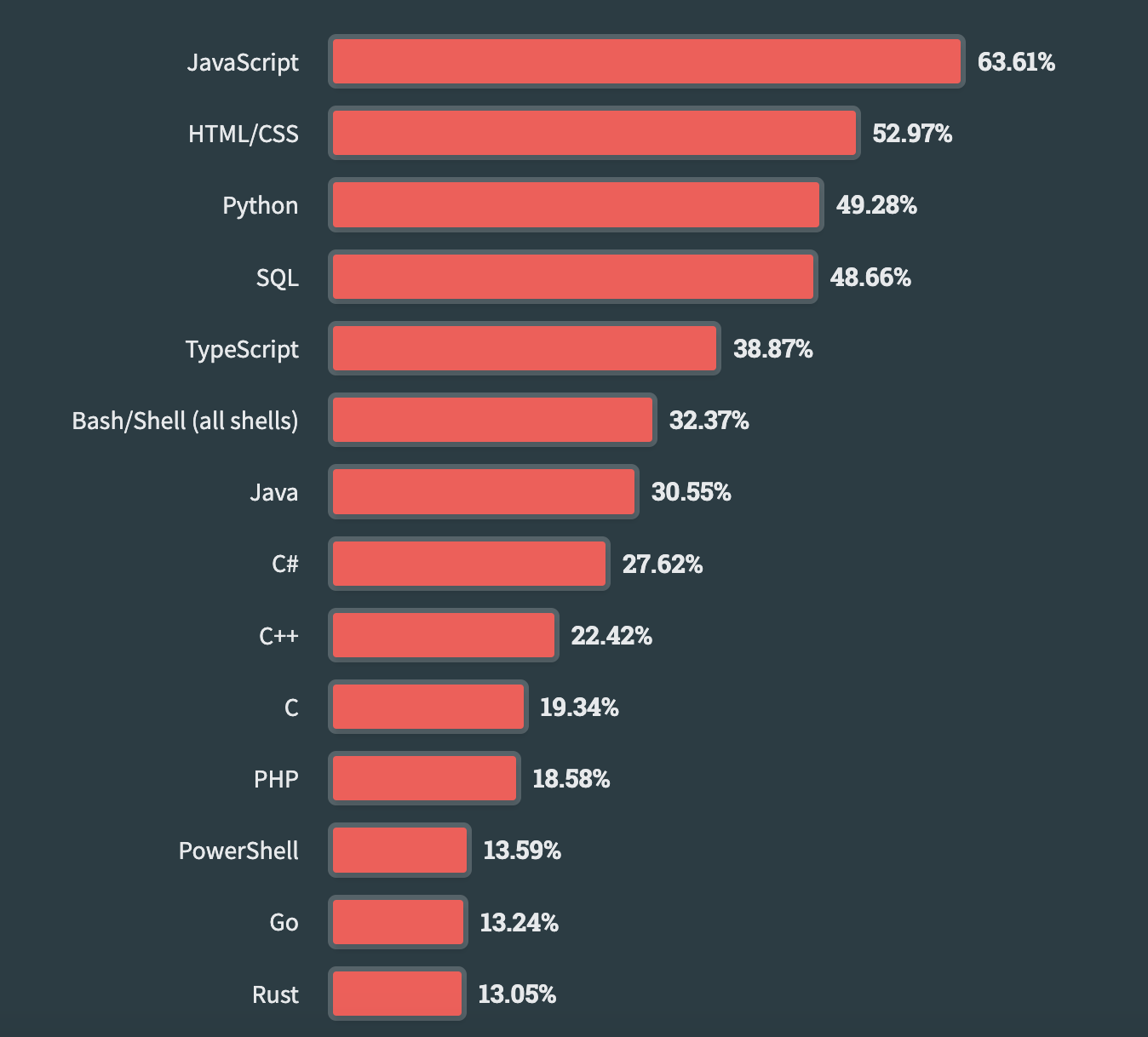
Source: Stack Overflow
And it can also serves as the backend, allowing you to create full-stack applications using only one programming language.
Hello World!
Without further ado, let's take a look at how JavaScript works in practice.
The easiest way to run JavaScript code is through our Code Playground.
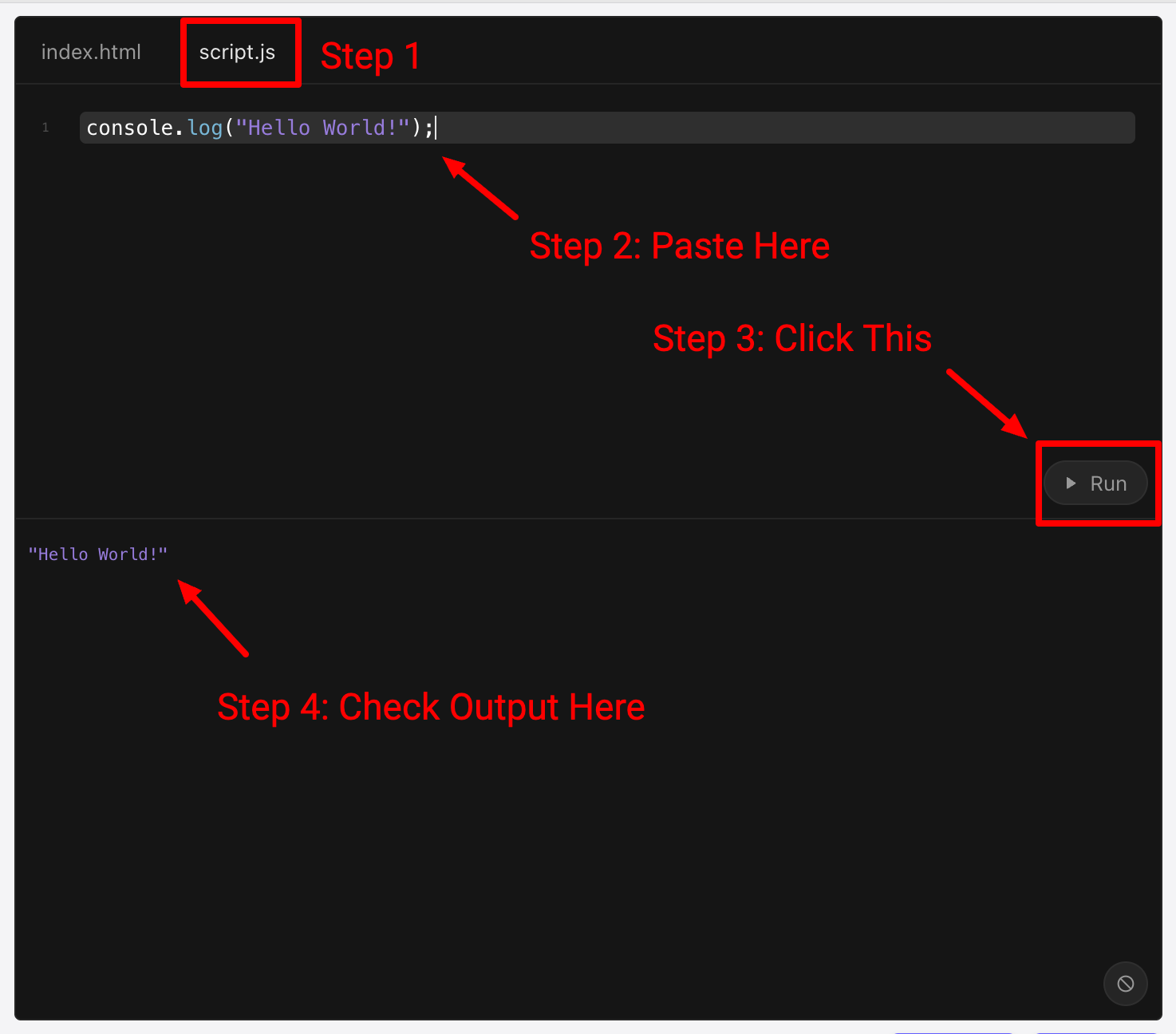
Go to the script.js tab, and copy and paste the following code:
console.log("Hello World!");Click the Run button, and you should see the output in the console below.
This example demonstrates how you can print the string Hello World! using JavaScript. Let's take a closer look.
console is called a module, which is like a package with different things packed inside.
console.log("Hello World!");The dot (.) is called a dot operator. It pulls stuff out of that package, and in this case, the function log() is pulled out of the console package.
console.log("Hello World!");A function is like a piece of machinery sealed inside a black box.
You can't see its internal workings, but the box offers an interface where you can give an input, and the box does something and returns an output.
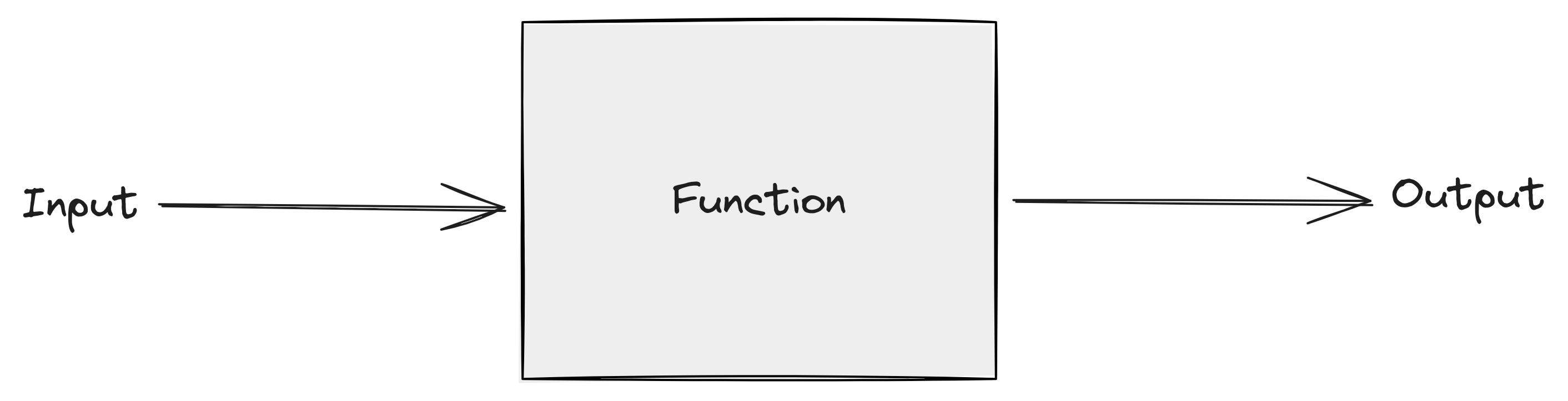
The function log() will take the input ("Hello World!"), and print it to the console.
Putting all of these components together, they form a statement, which is a full instruction that tells JavaScript to do something.
The semi-colon (;) marks the end of that statement.
console.log("Hello World!");<!DOCTYPE html> <html lang="en"> <head> <meta charset="UTF-8" /> <meta name="viewport" content="width=device-width, initial-scale=1.0" /> <title>Document</title> <style> #demo { width: 100px; height: 100px; background: red; position: absolute; left: 5px; top: 40px; transition: all 0.5s linear; } </style> </head> <body> <button onclick="moveDiv()">Move</button> <button onclick="returnDiv()">Return</button> <div id="demo"></div> <script src="/script.js"></script> </body> </html>