How to Style Lists Using CSS
There are three different types of lists in HTML: ordered, unordered, and description lists.
Ordered lists are defined with the <ol> element, and each list item is created with <li>.
<ol>
  <li>Apple</li>
  <li>Banana</li>
  <li>Orange</li>
</ol>
Unordered lists are defined with the <ul> element.
<ul>
  <li>Apple</li>
  <li>Banana</li>
  <li>Orange</li>
</ul>
Description lists are a bit more complex, as they consist of a list of items and a description for each item.
It is defined with the <dl> element, each list item is defined with <dt>, and each description statement is defined with <dd>.
<dl>
  <dt>Apple</dt>
  <dd>A delicious and nutritious fruit with a crisp texture.</dd>
  <dt>Banana</dt>
  <dd>A sweet and creamy fruit packed with essential nutrients.</dd>
  <dt>Orange</dt>
  <dd>A juicy and refreshing citrus fruit rich in vitamin C.</dd>
</dl>
Customizing list marker
By default, unordered lists are marked by dots, and ordered lists are marked with numbers.
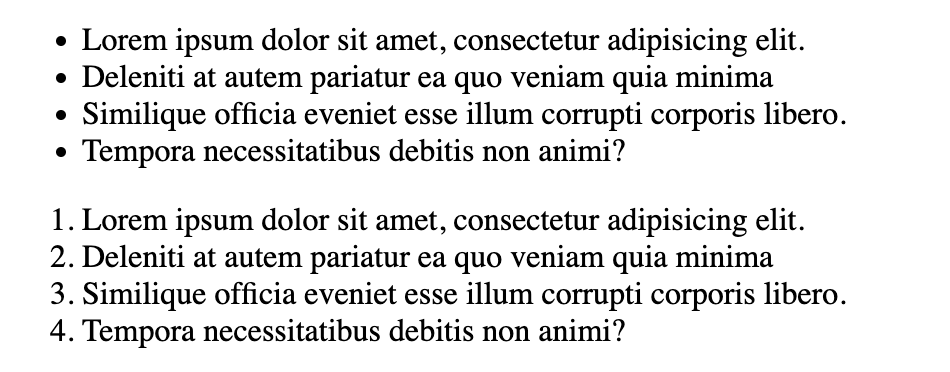
You can customize the list marker using the list-style-type property.
ul {
  list-style-type: circle;
}

ol {
  list-style-type: georgian;
}
For unordered lists, some common options include:
| Value | Description |
|---|---|
disc | The default filled circle marker. |
circle | A hollow circle marker. |
square | A filled square marker. |
none | Removes the marker entirely. |
For ordered lists, some common options include:
| Value | Description |
|---|---|
decimal | The default Arabic numerals (1, 2, 3). |
decimal-leading-zero | Numbers padded with a leading zero (01, 02). |
lower-alpha / upper-alpha | Letters (a, b, c / A, B, C). |
lower-roman / upper-roman | Roman numerals (i, ii, iii / I, II, III). |
georgian | Example of a language-specific numbering system. |
There are many more variants for ordered lists, as they have to account for the numbering system in many different languages.
We cannot cover all of them in this demo, but here is a full list of all built-in values for list-style-type property.
If these options are not enough, you can always extend the default options by passing a string value to the list-style-type property:
<ul class="string">
  <!-- . . . -->
</ul>

<ul class="emoji">
  <!-- . . . -->
</ul>.string {
list-style-type: " ** ";
}
.emoji {
list-style-type: "\1F600";
}In this example, \1F600 is the textual representation of the emoji character 😀. You can find a full list of emojis and their corresponding code on unicode.org.
For more complex customizations, you need to use @counter-style, which defines how list counters are converted into string representations. For example,
<ul class="thumbs-up">
  <!-- . . . -->
</ul>@counter-style thumbs-up {
system: cyclic;
symbols: "\1F44D";
suffix: " ";
}
.thumbs-up {
list-style: thumbs-up;
}Image marker
Besides these basic textual markers, you can also use images with the list-style-image property.
ul {
  list-style-image: url(marker.jpg);
}
url() is a CSS function that loads an external file, and in this case, we are loading the image marker.jpg, assuming you have the following file structure.
.
├── marker.jpg
├── index.html
└── style.css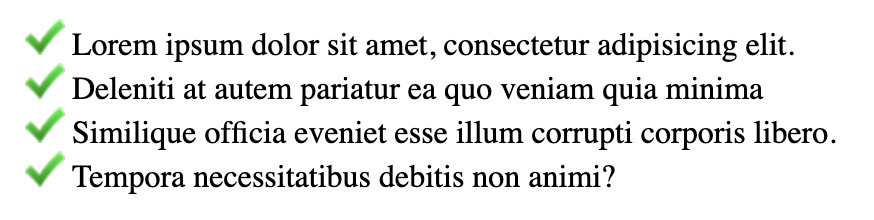
Control list numbering
You can customize the ordered list by controlling its numbering. For example, you can use the start attribute to control the starting number of the list.
<ol start="4">
  <li>Lorem ipsum dolor sit amet, consectetur adipiscing elit.</li>
  <li>Etiam ut quam at lacus volutpat congue eu at risus.</li>
  <li>Integer sed mauris lacinia augue aliquet ultricies.</li>
  <li>Ut quis magna ante.</li>
</ol>
You can also use the reversed attribute to make the list count in the reversed order.
<ol start="4" reversed>
  <li>Lorem ipsum dolor sit amet, consectetur adipiscing elit.</li>
  <li>Etiam ut quam at lacus volutpat congue eu at risus.</li>
  <li>Integer sed mauris lacinia augue aliquet ultricies.</li>
  <li>Ut quis magna ante.</li>
</ol>
If you want to micro-manage the numbering of individual list items, use the value attribute.
<ol>
  <li>Lorem ipsum dolor sit amet, consectetur adipiscing elit.</li>
  <li value="5">Etiam ut quam at lacus volutpat congue eu at risus.</li>
  <li>Integer sed mauris lacinia augue aliquet ultricies.</li>
  <li>Ut quis magna ante.</li>
</ol><!DOCTYPE html> <html lang="en"> <head> <meta charset="UTF-8"> <meta name="viewport" content="width=device-width, initial-scale=1.0"> <title>Document</title> <link rel="stylesheet" href="/styles.css"> </head> <body> <ol> <li>Apple</li> <li>Banana</li> <li>Orange</li> </ol> <ul> <li>Apple</li> <li>Banana</li> <li>Orange</li> </ul> <dl> <dt>Apple</dt> <dd>A delicious and nutritious fruit with a crisp texture.</dd> <dt>Banana</dt> <dd>A sweet and creamy fruit packed with essential nutrients.</dd> <dt>Orange</dt> <dd>A juicy and refreshing citrus fruit rich in vitamin C.</dd> </dl> </body> </html>