Add Backgrounds to HTML Elements
The background-* properties let you create and customize backgrounds for HTML elements.
The background-color property adds a pure-color background. This is a commonly used method for drawing users' attention to specific parts of a webpage.
For instance, you can highlight certain columns or rows in a table by specifying background colors.
<table>
  <tr>
    <th>Name</th>
    <th>Age</th>
    <th class="highlight">Occupation</th>
    <th>Country</th>
    <th>Email</th>
  </tr>
  <tr>
    <td>John Doe</td>
    <td>30</td>
    <td class="highlight">Software Engineer</td>
    <td>USA</td>
    <td>john.doe@example.com</td>
  </tr>
  . . .
</table>table {
border-collapse: collapse;
}
table,
th,
td {
border: 1px solid;
}
.highlight {
background-color: bisque;
}Zebra stripping is another common table styling technique.
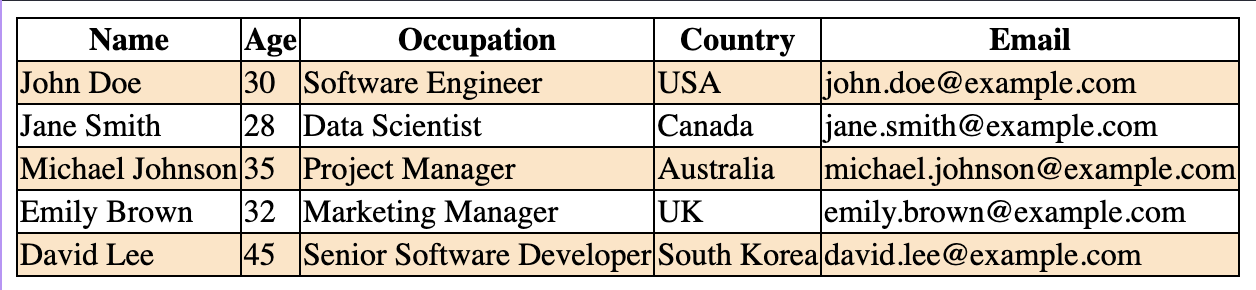
Instead of micromanaging individual rows, you can simply use the :nth-child pseudo-selector.
<table>
  <tr>
    <th>Name</th>
    <th>Age</th>
    <th>Occupation</th>
    <th>Country</th>
    <th>Email</th>
  </tr>
  <tr>
    <td>John Doe</td>
    <td>30</td>
    <td>Software Engineer</td>
    <td>USA</td>
    <td>john.doe@example.com</
table {
  border-collapse: collapse;
}

table,
th,
td {
  border: 1px solid;
}

tr:nth-child(even) {
  background-color: bisque;
}
By passing the parameter even, the styling will be applied to all even-numbered rows of the table.
Color backgrounds are also frequently combined with the :hover pseudo-selector to add more interactivity to the webpage.
For instance, when the cursor hovers over the table, the corresponding row is highlighted:
table {
  border-collapse: collapse;
}

table,
th,
td {
  border: 1px solid;
}

tr:nth-child(even) {
  background-color: bisque;
}

tr:hover {
  background-color: orange;
}<!DOCTYPE html> <html lang="en"> <head> <meta charset="UTF-8"> <meta name="viewport" content="width=device-width, initial-scale=1.0"> <title>Document</title> <link rel="stylesheet" href="/styles.css"> </head> <body> <table> <tr> <th>Name</th> <th>Age</th> <th class="highlight">Occupation</th> <th>Country</th> <th>Email</th> </tr> <tr> <td>John Doe</td> <td>30</td> <td class="highlight">Software Engineer</td> <td>USA</td> <td>john.doe@example.com</td> </tr> <tr> <td>Jane Smith</td> <td>28</td> <td class="highlight">Data Scientist</td> <td>Canada</td> <td>jane.smith@example.com</td> </tr> <tr> <td>Michael Johnson</td> <td>35</td> <td class="highlight">Project Manager</td> <td>Australia</td> <td>michael.johnson@example.com</td> </tr> <tr> <td>Emily Brown</td> <td>32</td> <td class="highlight">Marketing Manager</td> <td>UK</td> <td>emily.brown@example.com</td> </tr> <tr> <td>David Lee</td> <td>45</td> <td class="highlight">Senior Software Developer</td> <td>South Korea</td> <td>david.lee@example.com</td> </tr> </table> </body> </html>