
JavaScript Closure

🔒 The Invisible Backpack Every JavaScript Function Carries
A closure is a function that remembers the parent environment where it was created, even after that outer function has finished executing.
It's like a backpack that the function carries when it is created. It packs up all the variables in its surrounding scope and carries them around wherever it goes.
In this cheatsheet, we’ll talk about closures in JavaScript and how they work.
✅ What is a closure? ✅ How closure works ✅ Why closure ✅ Real-world applications ✅ Memory considerations
#javascript #closure #scope #functions #webdev #frontend #developer tools #coding #tips
What is a closure?
A closure is a function that remembers the environment in which it was created, even when that function is executed outside that scope.
Consider this function:
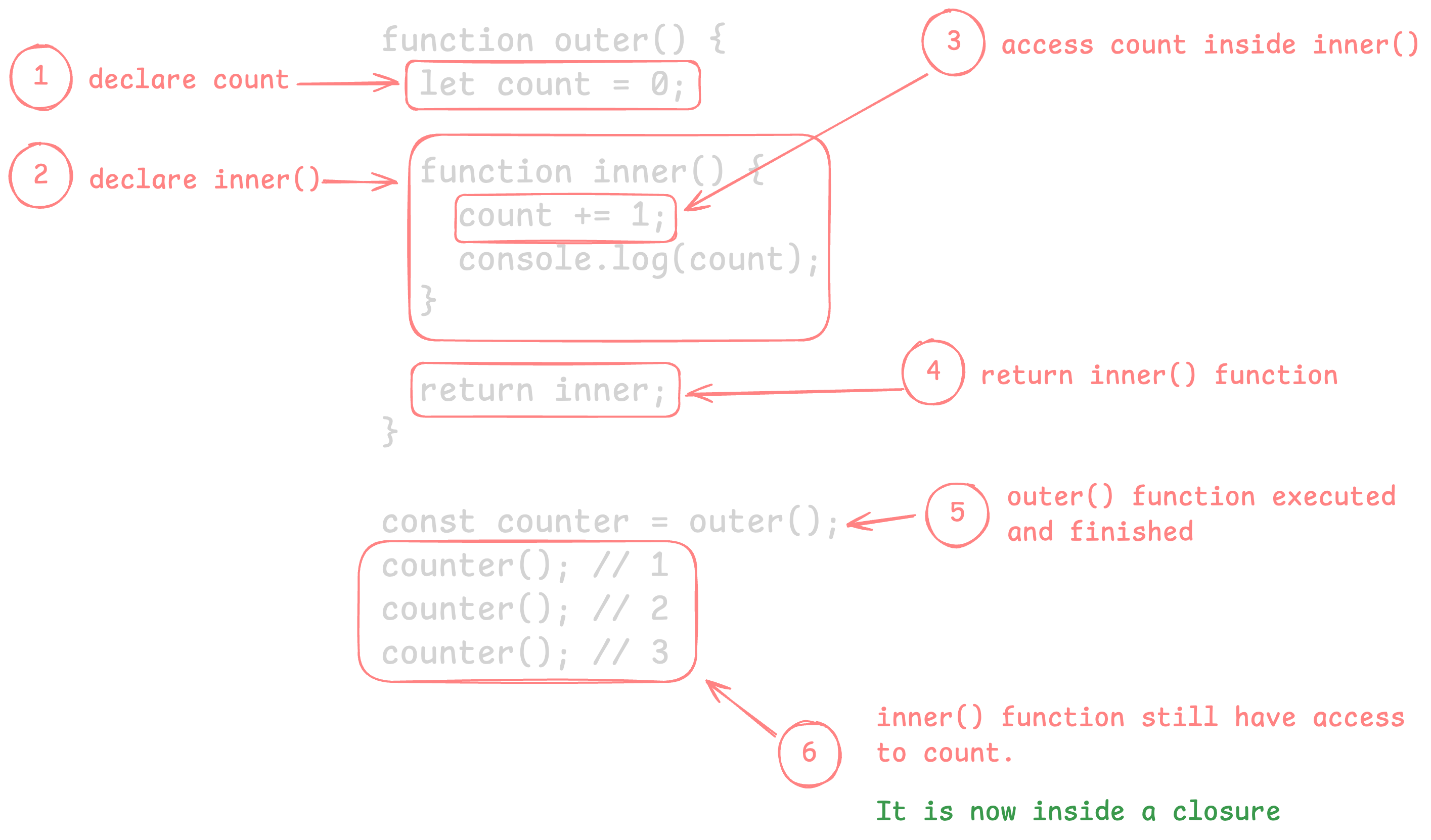
function outer() {
  let count = 0;

  function inner() {
    count += 1;
    console.log(count);
  }

  return inner;
}

const counter = outer();
counter(); // 1
counter(); // 2
counter(); // 3
How closure works
Why closure
Data privacy: Keep variables hidden from the global scope.
function createCounter() {
  let count = 0;

  return {
    increment() {
      count += 1;
      return count;
    },
  };
}

const counter = createCounter();

console.log(counter.increment()); // 1
console.log(counter.count); // undefined
State preservation: Maintain state between function calls without using global variables.
function createCounter(start = 0) {
  let count = start;

  return {
    increment() {
      count += 1;
      return count;
    },
  };
}

const counterA = createCounter(10);

console.log(counterA.increment()); // 11
console.log(counterA.increment()); // 12

const counterB = createCounter(0);

console.log(counterB.increment()); // 1
Real-world applications
Module pattern
Closures let you create modules with public and private members.
const bankAccount = (function () {
  let balance = 0;

  return {
    deposit(amount) {
      balance += amount;
      return balance;
    },
    withdraw(amount) {
      balance -= amount;
      return balance;
    },
    getBalance() {
      return balance;
    },
  };
})();

bankAccount.deposit(100);
console.log(bankAccount.getBalance()); // 100
Event handlers
Closures preserve data for callbacks and event listeners.
function setupButton(buttonId, message) {
  const button = document.getElementById(buttonId);

  button.addEventListener("click", () => {
    console.log(message);
  });
}

setupButton("save", "Saved!");
setupButton("delete", "Deleted!");
Function factories
Create functions configured with specific values.
function makeMultiplier(factor) {
  return function (number) {
    return number * factor;
  };
}

const double = makeMultiplier(2);
const triple = makeMultiplier(3);

console.log(double(5)); // 10
console.log(triple(5)); // 15
Memory considerations
Closures keep referenced variables alive. Be careful not to accidentally retain large objects.
function processBigData(data) {
  const huge = data; // retained by closure

  return function getSummary() {
    return huge.length;
  };
}

const summary = processBigData(largeArray);
// `largeArray` stays in memory as long as `summary` exists
Release closures when they are no longer needed to avoid memory leaks.
Full-Stack AI Developer Roadmap
From HTML & CSS to working with AI models, all in one structured roadmap.
