
JavaScript Async Programming

🚀 Mastering Asynchronous JavaScript
If you've been writing JavaScript for a while, you know that async programming isn't just about syntax, it is about the way you think.
We all know the progression:
🔁 Callback syntax → the foundation, but leads to callback hell
🤝 Promises → cleaner chaining and error propagation
⚡️ async/await → write async code that looks synchronous
🔄 Async iterators → handling streams of data seamlessly
But here’s what I’ve learned after years of working with async JavaScript:
- It’s not just about “non-blocking”
It’s about orchestration—managing timing, race conditions, cancellations, and backpressure. Understanding the Event Loop, microtasks, and macrotasks is what separates good from great.
- Error handling is crucial
Remember that unhandled rejections can still crash your app. Pair it with global error handlers and robust logging.
- Async iterators are underrated
Need to process paginated API responses or read large files line-by-line? for await...of is a game-changer for memory-efficient streaming.
- The future is cancelable
With AbortController and signals, we now have built-in ways to cancel fetch requests and clean up side effects, essential for user experience and resource management.
Async programming isn’t just a technical requirement. It's a design philosophy.
It forces you to think about user experience, responsiveness, and resilience from the very beginning.
#JavaScript #AsyncProgramming #WebDev #NodeJS #EventLoop #Promises #AsyncAwait #SoftwareEngineering #CodingTips #FrontendDeveloper #BackendDeveloper
JavaScript is single-threaded, but async programming lets you handle tasks like network requests, timers, and file I/O without blocking the main thread.
It allows operations run in the background and resume once they complete.
Callbacks
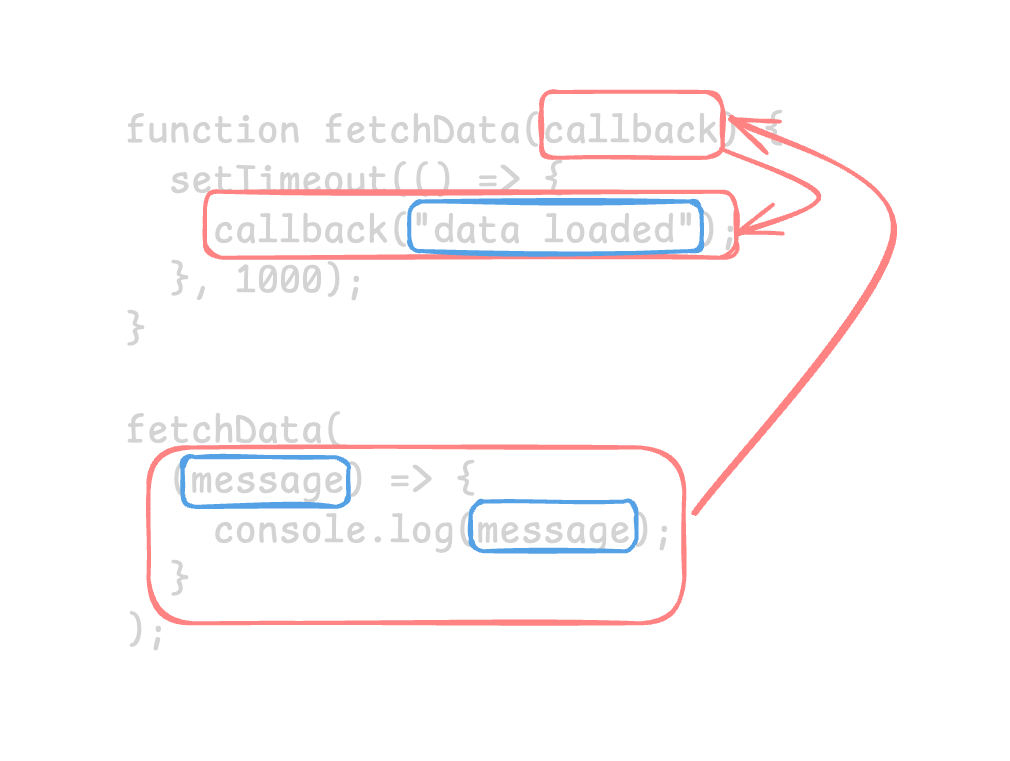
The original pattern for async code in JavaScript.
function fetchData(callback) {
  setTimeout(() => {
    callback("data loaded");
  }, 1000);
}

fetchData((message) => {
  console.log(message); // "data loaded"
});
It works, but nested callbacks can lead to "callback hell".
getData((data) => {
  processData(data, (processed) => {
    saveData(processed, (result) => {
      console.log(result);
    });
  });
});
Promises
A Promise represents a value that may not exist yet but will resolve or reject in the future.
It is a better syntax for writing async code.
const promise = new Promise((resolve, reject) => {
  setTimeout(() => {
    resolve("Success!");
  }, 1000);
});

promise.then((value) => console.log(value)); // "Success!"
A promise can have one of three states:
| State | Description |
|---|---|
pending | Initial state, neither fulfilled nor rejected. |
fulfilled | The operation completed successfully. |
rejected | The operation failed. |
then / catch / finally
Three promise methods to handle async results. Handle fulfilled, rejected, and settled promises:
fetch("https://api.example.com/user")
  .then((response) => response.json()) // Fulfilled
  .then((data) => console.log(data)) // Fulfilled
  .catch((error) => console.error(error)) // Rejected
  .finally(() => console.log("Done")); // Settled, runs regardless of outcome
async / await
Write async code that reads like synchronous code. A even more familiar syntax for handling promises.
async function getUser(id) {
  // await pauses execution until the promise resolves
  const response = await fetch(`/api/users/${id}`);
  const user = await response.json();
  return user;
}
Use try...catch for error handling.
async function loadUser(id) {
  try {
    const user = await getUser(id);
    console.log(user);
  } catch (error) {
    console.error("Failed to load user", error);
  }
}
Async iterators
Use for await...of to iterate over async data sources.
async function* generateIds() {
  for (let i = 1; i <= 3; i++) {
    yield await fetch(`/api/users/${i}`).then((r) => r.json());
  }
}

for await (const user of generateIds()) {
  console.log(user.name);
}
Full-Stack AI Developer Roadmap
From HTML & CSS to working with AI models, all in one structured roadmap.
