
JavaScript reduce() Method

🧮 reduce(), The JS Methods That Does Everything
If you look up the definition of reduce(), you'll find that it accumulates the array into a single value, the value could be a number, an object, or even another array.
The definition is vague, and it doesn't really explain what reduce() is or why you would use it.
That's because reduce() is a Swiss Army knife of array methods. It can do almost anything you want with an array, from summing numbers to grouping objects.
✅ Basic syntax ✅ Don't forget the initial value ✅ Always return the accumulator in the reducer ✅ Summing values ✅ Finding max and min ✅ Counting occurrences
#javascript #arrays #reduce #aggregation #functional #webdev #frontend #coding #tips
reduce() processes each element of an array and accumulates them into a single result via an reducer function.
const numbers = [1, 2, 3, 4];
const sum = numbers.reduce((acc, n) => acc + n, 0);

console.log(sum); // 10
Basic syntax
array.reduce((accumulator, element, index, array) => {
  // return updated accumulator
}, initialValue);| Parameter | Description |
|---|---|
accumulator | The value accumulated so far. |
element | The current element being processed. |
index | The index of the current element. |
array | The original array reduce was called on. |
initialValue | The starting value of the accumulator. |
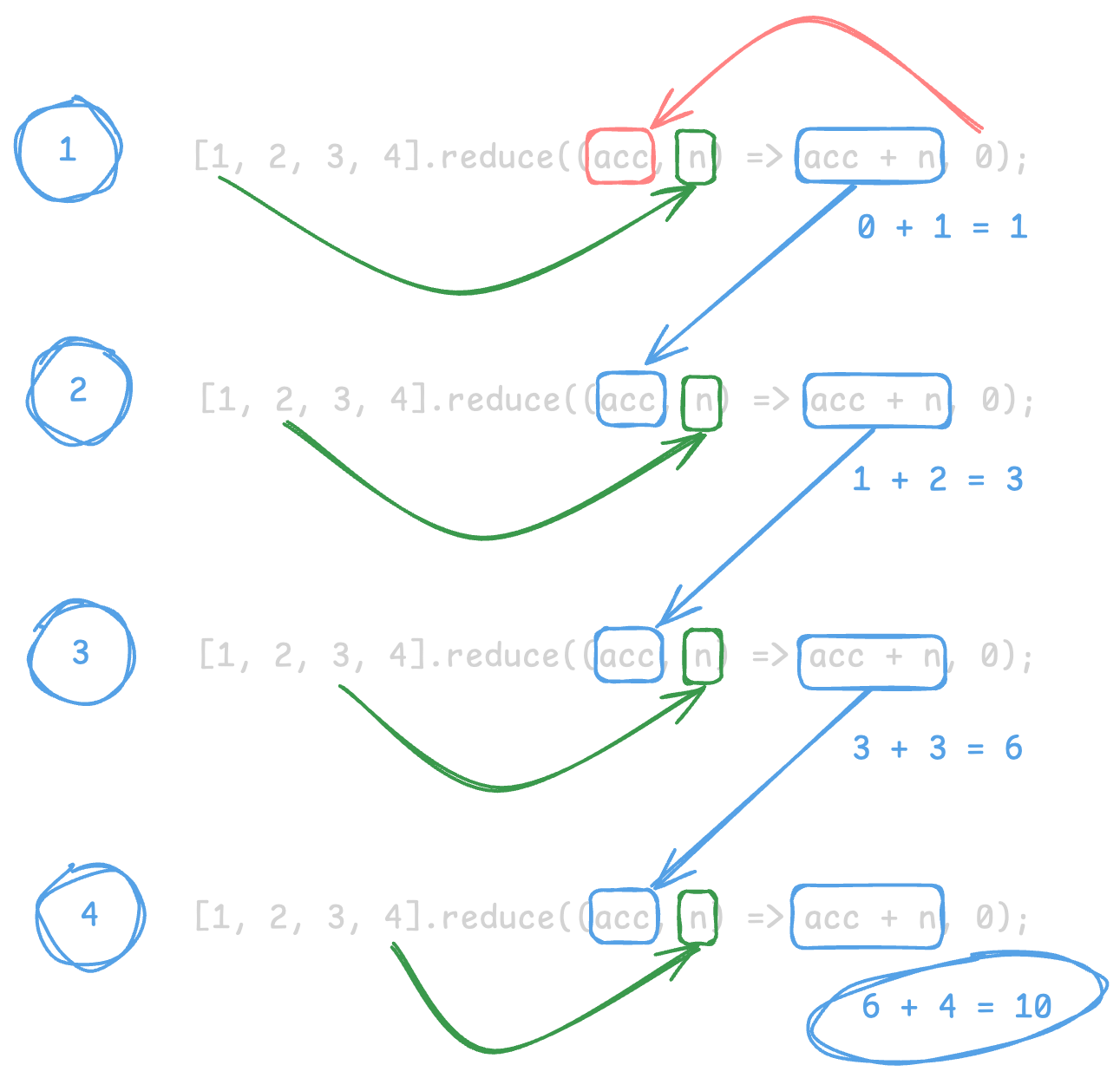
Don't forget the initial value
Without an initial value, reduce() uses the first element as the accumulator.
const numbers = [1, 2, 3];
const sum = numbers.reduce((acc, n) => acc + n);
console.log(sum); // 6
For empty arrays, this throws a TypeError.
const empty = [];
// empty.reduce((acc, n) => acc + n); // TypeError
Always provide an initial value when the array might be empty.
const sum = empty.reduce((acc, n) => acc + n, 0);
console.log(sum); // 0
Always return the accumulator in the reducer
Always return the accumulator in the reducer.
// ❌ Incorrect: missing return statement
const broken = numbers.reduce((acc, n) => {
  acc + n; // ❌ no return
}, 0);// ✅ Correct: return the updated accumulator
const sum = numbers.reduce((acc, n) => {
return acc + n; // ✅ return the updated accumulator
}, 0);Summing values
Add all numbers in an array.
const prices = [10, 20, 30];
const total = prices.reduce((sum, price) => sum + price, 0);

console.log(total); // 60
Sum a property from objects.
const cart = [
  { name: "Apple", price: 1 },
  { name: "Banana", price: 2 },
];

const total = cart.reduce((sum, item) => sum + item.price, 0);
console.log(total); // 3
Finding max and min
const scores = [45, 82, 67, 91, 55];

const max = scores.reduce((acc, score) => (score > acc ? score : acc));
console.log(max); // 91

const min = scores.reduce((acc, score) => (score < acc ? score : acc));
console.log(min); // 45
Counting occurrences
const fruits = ["apple", "banana", "apple", "orange", "banana"];

const counts = fruits.reduce((acc, fruit) => {
  acc[fruit] = (acc[fruit] || 0) + 1;
  return acc;
}, {});

console.log(counts);
// { apple: 2, banana: 2, orange: 1 }
Full-Stack AI Developer Roadmap
From HTML & CSS to working with AI models, all in one structured roadmap.
