
DSA Hash Tables

#️⃣ Hash Tables Cheatsheet
Hash tables map keys to values with O(1) average lookups. This cheatsheet covers how they work, collisions, and the patterns they enable.
✅ How hashing works ✅ Collision handling ✅ Map and Set in JavaScript ✅ Frequency counting ✅ Common patterns
#dsa #hashtable #hashmap #map #set #interview #coding #tips
A hash table stores key-value pairs using a hash function to compute an index. Average O(1) for insert, delete, and lookup.
How it works
A hash table is an array plus a hash function.
class HashTable {
  constructor(size = 53) {
    this.buckets = new Array(size);
  }

  hash(key) {
    // . . .
  }
}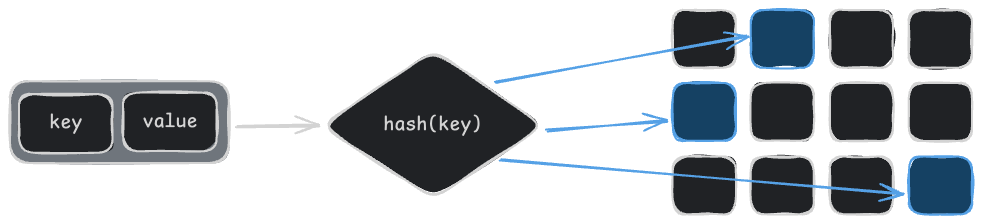
A hash function converts a key into an array index.
hash(key)computes an index.- The value is stored at that index.
- Lookups hash the key again and go straight to the index.
Collisions
Two keys can hash to the same index. This can be handled by:
Chaining: each slot is a chain that holds a list of entries.

Open addressing: go to the next empty slot.
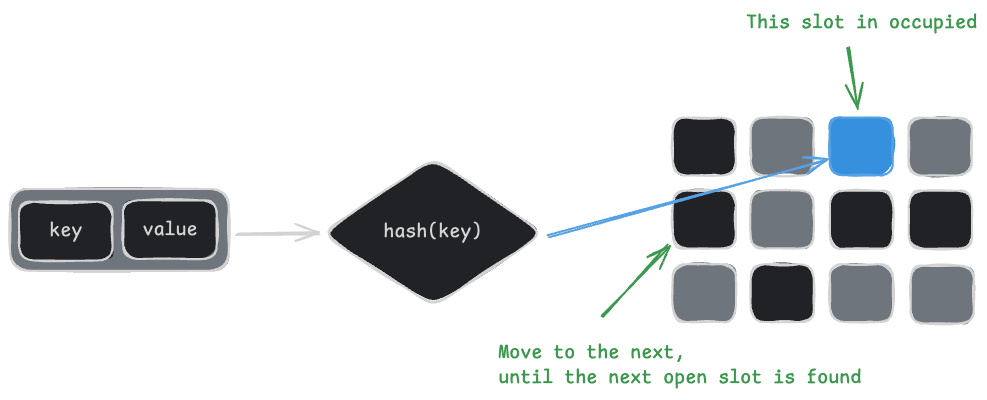
Worst case is O(n) when all keys collide, but a good hash function keeps it rare.
The hash function
Convert a key into an array index. Multiply by a prime to spread values out evenly.
hash(key) {
  let total = 0;

  for (let i = 0; i < key.length; i++) {
    // Multiply by a prime to spread values out
    total = (total * 31 + key.charCodeAt(i)) % this.buckets.length;
  }

  return total;
}
The same key always produces the same index. Different keys should spread across the array.
Storing values
Hash the key, then add or update the entry in the chain.
set(key, value) {
  const index = this.hash(key);

  // Create the chain if the slot is empty
  if (!this.buckets[index]) {
    // Use an array for the chain.
    // Each entry is a [key, value] pair.
    this.buckets[index] = [];
  };

  // Update the value if the key already exists
  const chain = this.buckets[index];
  for (const entry of chain) {
    if (entry[0] === key) {
      entry[1] = value;
      return;
    }
  }

  // Otherwise, add a new entry to the chain
  chain.push([key, value]);
}
Reading values
Hash the key, then walk the chain looking for a match.
get(key) {
  const index = this.hash(key);
  const chain = this.buckets[index];

  // Walk the chain looking for the key
  if (chain) {
    for (const entry of chain) {
      if (entry[0] === key) return entry[1];
    }
  }

  return undefined;
}
Removing values
Find the entry in the chain and remove it.
delete(key) {
  const index = this.hash(key);
  const chain = this.buckets[index];

  if (chain) {
    for (let i = 0; i < chain.length; i++) {
      // Found the key, remove it from the chain
      if (chain[i][0] === key) {
        chain.splice(i, 1);
        return true;
      }
    }
  }

  return false;
}
Usage
const table = new HashTable();

table.set("name", "Ada");
table.set("city", "London");

table.get("name"); // "Ada"
table.get("missing"); // undefined

table.delete("city"); // true
table.get("city"); // undefined
Map and Set in JavaScript
JavaScript's Map and Set are built-in hash tables. Use them instead of building your own.
const map = new Map();
map.set("name", "Ada");
map.get("name"); // "Ada"
map.has("name"); // true
map.delete("name"); // trueconst set = new Set([1, 2, 2, 3]);
set.has(2); // true
set.size; // 2Full-Stack AI Developer Roadmap
From HTML & CSS to working with AI models, all in one structured roadmap.
